
How to Use AI to Generate Blog Intros
If you want to learn how to use AI to generate Blog Intros, Here is a quick guide:
Ever read a blog intro that kept you glued to the screen, making it impossible to close the tab? You know the feeling – those first few sentences that hook you so completely that you have to keep reading to see what comes next.
That’s the power of a masterfully crafted blog introduction. And here’s the game-changing news: with AI tools, creating these magnetic intros is no longer reserved for seasoned copywriters or marketing geniuses.
In today’s fast-paced digital world, you have approximately 3 seconds to capture your reader’s attention before they bounce to something else. About 73% of people admit to skimming blog posts, and 52% of bloggers report it’s getting increasingly difficult to engage readers. This means your introduction isn’t just important – it’s make-or-break for your entire piece.
But what if I told you that AI could help you craft introductions that consistently hook readers, address their pain points, and compel them to keep reading? In this comprehensive guide, you’ll discover how to leverage artificial intelligence to create blog introductions that captivate from the very first word.
Why Blog Introductions Make or Break Your Content
Your blog introduction is like the front door to your content house. A welcoming, intriguing entrance invites people in, while a bland, generic one sends them walking away. With 600+ million blogs competing for attention, standing out isn’t just helpful – it’s essential for survival.
Think about it this way: readers scan your headline, land on your page, and within seconds decide whether your content is worth their time. Your introduction is their first real taste of what you’re offering, and first impressions in the digital world are often final impressions.
A compelling introduction accomplishes three critical things:
- Grabs attention immediately and creates an emotional connection
- Establishes relevance by addressing the reader’s specific pain points or interests
- Sets clear expectations about what value they’ll gain by continuing to read
Related: 15 Of the Longest Words in English
The Anatomy of an AI-Generated Blog Introduction That Works
Before diving into AI prompts and tools, it’s important to understand what makes a blog introduction truly effective. Every great intro contains these three essential elements:
The Hook
This is your opening line – the make-or-break moment that determines whether readers stay or leave. CoSchedule’s research shows that effective hooks can take many forms:
- Thought-provoking questions that resonate with your audience
- Surprising statistics that challenge assumptions
- Personal stories that create emotional connection
- Bold statements that spark curiosity
- Relatable scenarios that readers immediately recognize
The Transition
This bridges your hook to the main content, providing context while maintaining momentum. The transition should build upon your hook, adding depth without losing the reader’s interest. It’s where you begin to validate their pain points and hint at the solution you’re about to provide.
The Promise
This is where you explicitly tell readers what they’ll gain by continuing. It’s your content contract – a clear statement of the value, insights, or solutions waiting for them. According to Outranking, this element is crucial for keeping readers engaged through your entire piece.
Proven AI Prompt Templates for Irresistible Blog Intros
The secret to getting excellent results from AI lies in crafting detailed, specific prompts. Here are battle-tested templates that consistently produce engaging introductions:
The Question-Hook Template
Write an engaging blog introduction for a post titled "[YOUR TITLE]". Start with a compelling question that [SPECIFIC AUDIENCE] would immediately relate to. Follow with 2-3 sentences that agitate the problem, then end with a clear promise of what readers will learn. Keep it under 150 words and use a [TONE] tone.
The Story-Driven Template
Create a blog introduction using a relatable personal story or scenario for "[TOPIC]". The story should connect with [TARGET AUDIENCE] who struggle with [SPECIFIC PROBLEM]. Transition from the story to explain why this matters, then promise the solution. Use conversational language and keep under 200 words.
The Statistic-Shock Template
Write a blog introduction starting with a surprising statistic about [TOPIC] that would shock [AUDIENCE]. Explain why this statistic matters to them personally, agitate their pain point, then promise actionable solutions. Include the exact keyword "[KEYWORD]" in the first two sentences. Tone: [AUTHORITATIVE/FRIENDLY/URGENT]
The Problem-Agitation-Solution (PAS) Template
Generate a blog introduction using the PAS framework for "[BLOG TITLE]". Start by identifying the main problem [AUDIENCE] faces with [TOPIC]. Agitate by explaining the consequences of not solving this problem. End with a strong promise about the solution you'll provide. Target length: 175 words.
The Contradiction Template
Create an introduction that challenges conventional wisdom about [TOPIC]. Start with "Most people believe [COMMON BELIEF], but..." then present your contrarian viewpoint. Explain why this matters to [AUDIENCE] and promise to reveal the truth. Use persuasive language and maintain intrigue throughout.
Advanced AI Prompting Strategies for Better Results
Getting truly exceptional introductions from AI requires understanding how to communicate effectively with these tools. RightBlogger’s analysis reveals that the best AI prompts include six key elements:
1. Task Definition
Be crystal clear about what you need. Instead of “write an intro,” specify “write a 150-word blog introduction that hooks busy professionals.”
2. Context Provision
Give the AI relevant background information about your topic, audience, and the specific angle you’re taking. The more context you provide, the more tailored and relevant the output will be.
3. Exemplar Inclusion
Show the AI examples of the style or format you want. If you have introductions you admire, include them as reference points.
4. Persona Assignment
Tell the AI what role to play. Should it write as an expert, a peer, or a mentor? This dramatically affects the tone and approach.
5. Format Specification
Be explicit about structure. Do you want multiple paragraphs? Bullet points? A specific word count?
6. Voice and Tone Guidelines
Define the personality you want the introduction to convey – professional, casual, urgent, empathetic, etc.
Related: 15 Of the Longest Words in English
How to Use AI to Generate Blog Intros
Step 1: Access Your WordWriter Account
Sign in to WordWriter as an existing user or sign up to create a new account. This will give you access to their comprehensive AI Dashboard where all the magic happens.
Step 2: Navigate the AI Dashboard
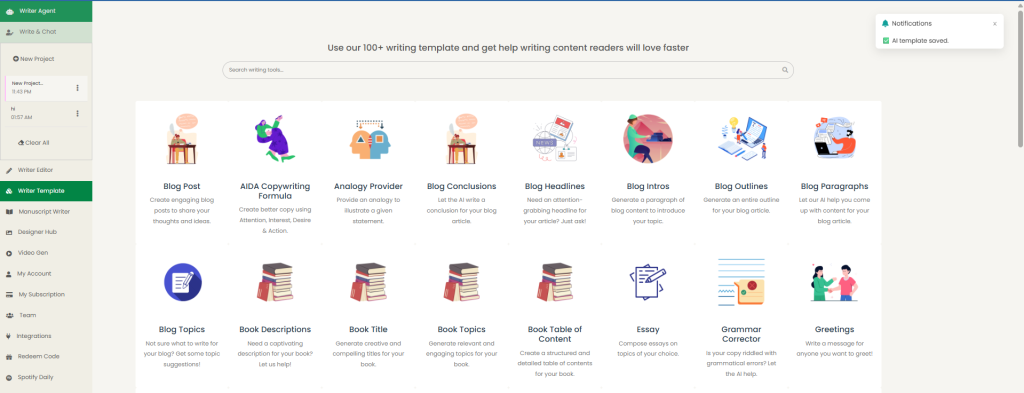
Once signed in, the AI Dashboard will be displayed with lots of AI templates available for different content needs. You’ll see various options designed to help with different aspects of content creation.
Step 3: Find the Blog Intro Template
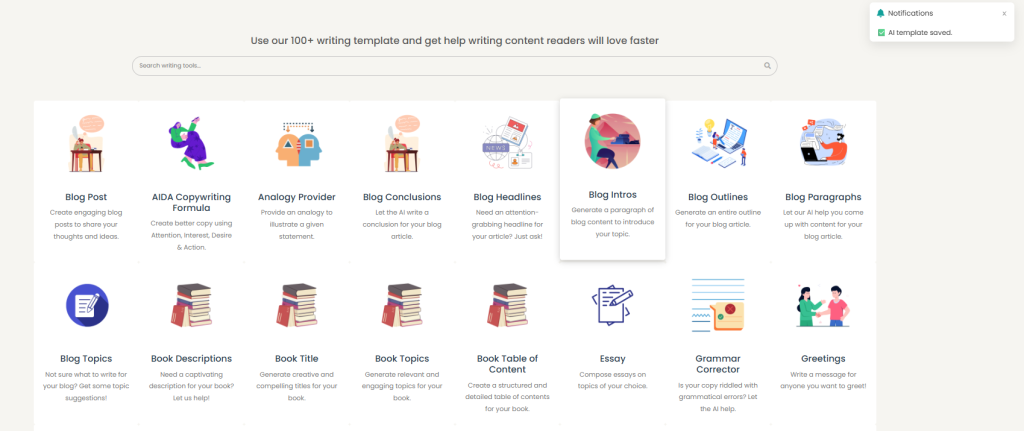
Either search for “blog intro” in the search bar or scroll through the available templates to locate the blog intro template. This specialized tool is specifically designed for crafting compelling introductions.
Step 4: Use the Template
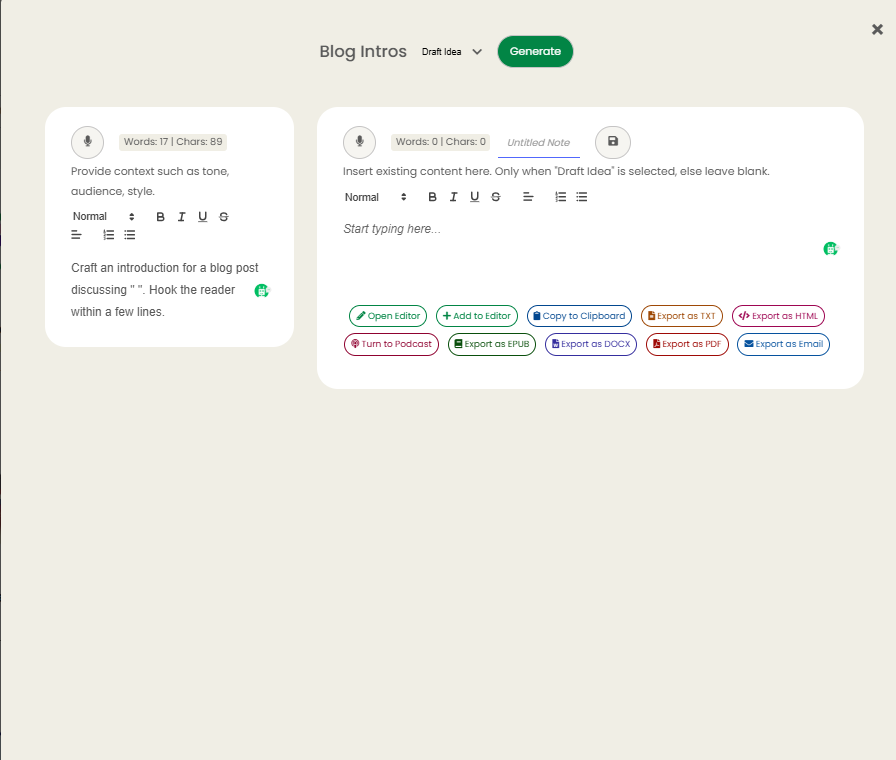
Tap on the blog intro template to open it. Follow the prompts provided by the system, which will guide you through inputting your topic, target audience, and desired tone.
Step 5: Generate Your Introduction
After filling in all the required information, hit the generate button. The AI will create a compelling blog introduction tailored to your specifications in just seconds.
Conclusion
The power to create introductions that captivate, engage, and convert is now at your fingertips. By combining AI efficiency with human creativity and insight, you can consistently produce blog introductions that keep readers glued to their screens – just like the one that brought you here.
