
How to Generate Beginner’s Guide Using AI
If you want to share your expertise but struggle to simplify complex topics, learning how to generate beginner’s guide using AI can transform your content creation process. Writing for novices is surprisingly difficult. Experts often suffer from the curse of knowledge, which is the subconscious tendency to assume that readers already understand basic terminology and concepts.
Artificial intelligence helps bridge this gap. By translating complex technical jargon into clear, accessible steps, AI allows you to scale your content production. However, relying solely on automated generation can result in robotic, generic guides. The secret to success lies in balancing AI efficiency with human empathy, structure, and real-world detail.
Using a specialized tool like WordWriter, you can streamline this process. Here is a practical, step-by-step framework to create high-quality, beginner-friendly resources.
Why Use AI for Creating Beginner Guides?
Creating an introductory guide requires logical structuring and simplified language. AI excels at these tasks because it can process vast amounts of information and reorganize it into structured frameworks.
- Logical Information Hierarchy: AI algorithms are trained to organize topics from the simplest concepts to more advanced steps, ensuring your reader does not get overwhelmed.
- Tone Adjustment: You can instruct AI to write in an encouraging, friendly, and accessible tone, which is perfect for anxious beginners.
- Rapid Brainstorming: If you are unsure where to start, AI can generate outline ideas, list potential challenges beginners face, and suggest metaphors to explain difficult concepts.
While the benefits are clear, the best guides are a collaborative effort. AI provides the structure and draft, while you provide the unique insights, real-world examples, and final quality control.
How to Generate Beginner’s Guide Using AI: A Step-by-Step WordWriter Workflow
WordWriter is an advanced AI writing assistant designed to generate structured, engaging, and highly readable content. Follow this step-by-step workflow to produce an exceptional guide.
Step 1: Define Your Target Audience and Scope
Before opening WordWriter, clarify who your beginner is. A beginner’s guide to coding for a tech-savvy teenager is very different from a beginner’s guide to coding for a retired accountant.
Ask yourself these questions:
- What is the reader’s starting point?
- What is the ultimate goal they want to achieve by the end of the guide?
- What tools or prerequisites do they need before they start?
Step 2: Sign In and Access the Beginner’s Guide Templat
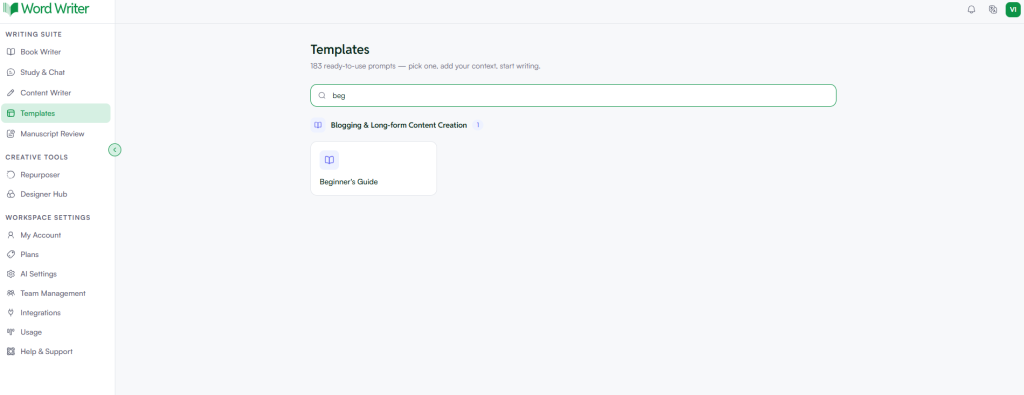
Once you have clarity on your topic and audience, head over to WordWriter and sign in to your account. You will land on your dashboard, which gives you a full view of your active projects and writing tools.
From there, follow these quick steps:
- On the left side of your dashboard, tap on Templates.
- In the search bar, type “Beginner’s Guide” and select the template from the results.
- Fill in the input fields. This is where you add your topic, target audience, tone preference, and any key details you want the guide to cover.
- Hit Generate.
That is all. WordWriter produces a fully structured, already-edited beginner’s guide based on your inputs. The template handles the formatting, section flow, and language simplification automatically, so you are not starting from a blank page. You get a clean, publish-ready draft in minutes.
Step 3: Input a Highly Specific Prompt into WordWriter
If you want more control over the output, WordWriter’s Blog Post template is a great starting point. From your dashboard, tap Templates on the left side, search for Blog Post, and select it. From there, input your prompt directly into the provided field.
Avoid vague instructions. Instead of asking the AI to “write a guide about photography,” feed it a structured prompt that establishes the role, target audience, tone, and specific constraints.
Here is a practical template you can copy and modify:
“Act as an expert instructor. Write a detailed outline for a beginner’s guide to digital photography for absolute novices who own a basic DSLR camera. The tone should be encouraging, clear, and free of overly technical jargon. Include five logical chapters, starting with understanding camera modes and ending with taking a first manual photo.”
Once you paste your prompt and hit Generate, WordWriter produces a structured, already-edited draft based on exactly what you specified.
Step 4: Develop and Refine the Outline
WordWriter will generate a comprehensive outline based on your prompt. Do not skip the review phase here. Analyze the structure to ensure it flows logically.
Make sure the outline includes:
- An encouraging introduction that sets expectations.
- A “What You Need” section to prepare the reader.
- Step-by-step core chapters with clear, actionable headings.
- A troubleshooting section addressing common mistakes.
- A conclusion that celebrates their progress and suggests next steps.
Step 5: Draft Content Section by Section
Instead of asking WordWriter to generate the entire guide in one go, generate it section by section. This modular approach ensures depth, prevents the AI from skipping important details, and keeps the content highly focused.
For each section, instruct the AI to use formatting elements such as bullet points, numbered lists, and bold text for key terms. This dramatically improves readability for beginners who tend to skim content.
Step 6: Inject Real-World Analogies and Edit
Once WordWriter has generated the draft, it is time for the human touch. Read through the text to add real-world analogies. For example, if the AI explains computer RAM, you can add a sentence comparing RAM to the top of an office desk (where you keep things you are actively working on) and the hard drive to a filing cabinet (where you store things for later).
Best Practices for Writing an Easy-to-Follow Guide
To ensure your AI-assisted guide is genuinely useful, keep these formatting and stylistic best practices in mind.
Avoid Jargon and Define Terms Instantly
If you must use a technical term, define it immediately in parentheses or within a callout box. Never assume the reader knows what an acronym stands for.
Keep Paragraphs Short
Large blocks of text intimidate new learners. Keep your paragraphs to three sentences or fewer. This creates white space on the page, making the guide feel approachable and easy to digest.
Use Visual Placeholders
Beginners learn best when they can see what you are talking about. As you review your AI-generated text, insert placeholders where screenshots, diagrams, or video links should go.
Pitfalls to Avoid When You Generate Beginner’s Guide Using AI
While AI tools like WordWriter make the writing process much faster, creators should watch out for a few common mistakes.
- The Hallucination Trap: AI models can sometimes present incorrect facts or outdated software steps as truth. Always verify technical steps, especially code snippets, software menus, or safety guidelines.
- The Fluff Factor: If not properly guided, AI can produce repetitive, generic sentences. Use WordWriter’s refinement features to condense sentences and demand actionable advice.
- Ignoring the Emotional Journey: Beginners often feel frustrated or intimidated. Ensure your guide acknowledges these feelings, offering reassuring words at points where learners typically get stuck.
Conclusion
Learning how to generate beginner’s guide using AI is a powerful way to share knowledge at scale. By combining the speed, structure, and clarity of WordWriter with your personal expertise and empathy, you can create educational resources that truly help people learn new skills.
Ready to create your first comprehensive guide? Sign up for WordWriter today, input your topic, and start building high-quality instructional content in minutes.
FAQ
Can AI write a complete beginner’s guide without human editing?
While AI can generate a highly structured and coherent draft, human editing is essential. You need to review the content to verify technical accuracy, add personal anecdotes, insert visual aids, and ensure the tone perfectly matches your brand.
How do I prevent the AI from generating content that is too technical?
Specify the audience clearly in your prompt. Use phrases like “explain this to a ten-year-old,” “avoid advanced industry jargon,” or “define every technical term as soon as it is introduced.”
What is the ideal length for an AI-generated beginner’s guide?
The length depends on the complexity of the topic. However, most effective beginner guides run between 1,500 and 3,000 words. It is best to break longer guides into chapters or a multi-part series to avoid overwhelming the reader.
Can I use AI to generate step-by-step software tutorials?
Yes, AI is excellent at structuring software tutorials. However, because software interfaces update frequently, you must manually double-check that the AI-generated menu names, button labels, and navigation paths match the current version of the software.
