
How to Generate Video Titles Using AI

Want to learn how to generate video titles using AI? Here is a Quick guide.
Your video title is the first—and often only—chance you have to capture a viewer’s attention and convince them to click play. It’s the gateway between your carefully crafted content and your target audience.
While great content forms the foundation of successful videos, even the most valuable and entertaining content can go unnoticed without compelling titles.
Research shows that 90% of the best-performing videos on YouTube have custom thumbnails and optimized titles, yet many content creators struggle with title creation, often spending hours brainstorming or settling for mediocre options that fail to capture their content’s true potential.
In this Guide, We will providing you with the details on how to use AI to generate video titles, stay glued!!!
The Powerful Benefits of Using AI to Generate Video Titles
1. Dramatic Time Savings
Traditional brainstorming sessions for video titles can consume 30 minutes to several hours per video. AI title generators can produce dozens of compelling options in under 30 seconds, allowing you to focus your creative energy on content production rather than getting stuck in the ideation phase.
Real Impact: Content creators report saving 2-3 hours per week on title creation alone, time that can be reinvested into video production, audience engagement, or content strategy.
2. Enhanced Creativity and Fresh Perspectives
AI algorithms draw from vast databases of successful content patterns, trending phrases, and audience engagement data to suggest titles you might never have considered. This helps break through creative blocks and introduces new angles for presenting your content.
3. SEO Optimization Built-In
Modern AI title generators understand search engine optimization principles and can incorporate relevant keywords naturally while maintaining readability and appeal. This dual focus on human psychology and search algorithms maximizes both discoverability and click-through rates.
4. Data-Driven Decision Making
Rather than relying solely on intuition, AI tools analyze successful title patterns across millions of videos, identifying what works for specific niches, audiences, and content types. This removes much of the guesswork from title creation.
5. Consistency Across Content
AI can maintain brand voice and messaging consistency while still providing variety, ensuring your titles feel cohesive across your content library while avoiding repetitive patterns that might bore your audience.
6. A/B Testing Capabilities
Generate multiple high-quality options instantly, enabling you to test different approaches, styles, and keywords to identify what resonates most with your specific audience.
How to Generate Video Titles Using AI (Wordwriter Guide)
WordWriter stands out as one of the most intuitive and powerful AI platforms for content creation, including video title generation. Follow this comprehensive guide to harness its capabilities for your video content.
Step 1: Navigate to WordWriter

1. Open your preferred web browser and go to the WordWriter platform. The clean, professional interface immediately signals the tool’s focus on serious content creation rather than gimmicky features.
2. Take a moment to familiarize yourself with the homepage, which showcases various AI writing capabilities and user testimonials that demonstrate the platform’s effectiveness across different content types.
Step 2: Login or ‘Try it Free’ Process
3. If you’re a new user, click the “Try it Free” button prominently displayed in the top right corner. Existing users can click “Login” to access their accounts immediately.
4. For new accounts, you’ll need to provide:
- A valid email address (this will be your username)
- A secure password (the system will guide you toward strong password creation)
- Basic profile information to help customize your AI experience
5. Complete the email verification process by checking your inbox and clicking the confirmation link. This step ensures account security and enables all platform features.
Step 3: Access the AI Dashboard
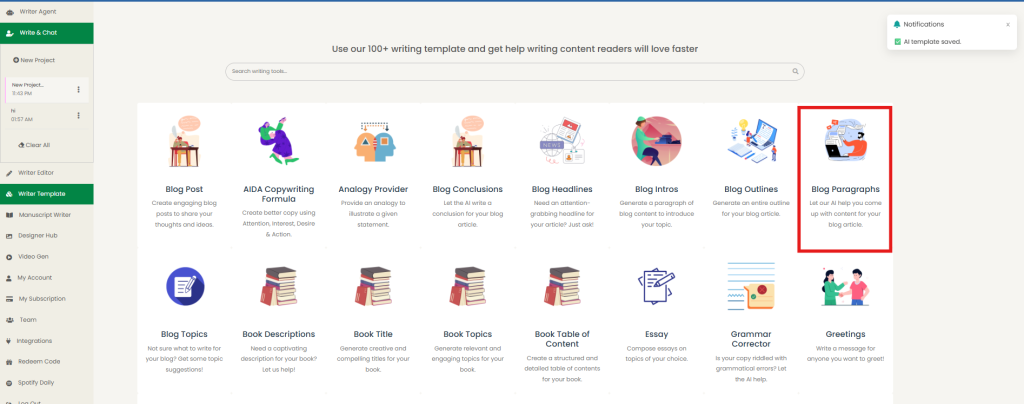
6. Once logged in, you’ll land on WordWriter’s main dashboard—your command center for all AI writing tasks. The dashboard features a clean layout with easy navigation to different content types and tools.
7. Notice the sidebar menu that organizes different writing templates by category (Marketing, Social Media, Video Content, etc.) and the main area that displays recent projects and quick-start options.
Step 4: Find the Video Title Template
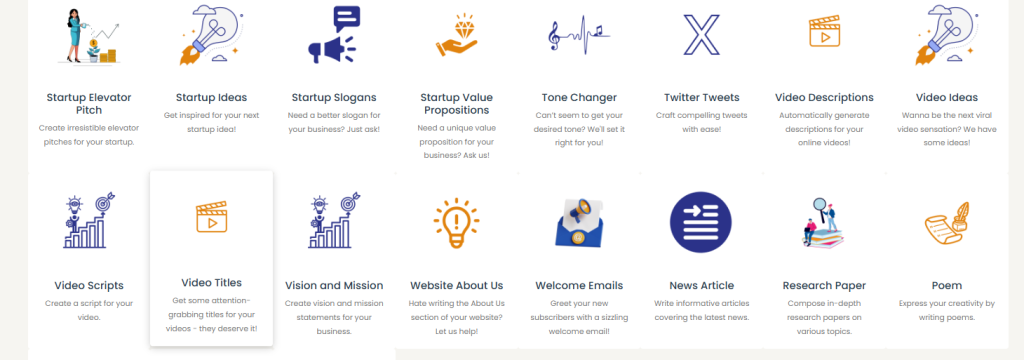
8. You have two efficient ways to locate the video title generator:
Method A – Search Bar:
- Click on the search bar at the top of the dashboard
- Type “video title” or simply “title”
- The system will display relevant templates, with the video title generator prominently featured
Method B – Browse Categories:
- Scroll through the template categories or click on “Video Content” in the sidebar
- Look for the “Video Title Generator” template, usually accompanied by a play button icon
9. Click on the Video Title Generator template to open the dedicated workspace.
Step 5: Provide Context and Video Details
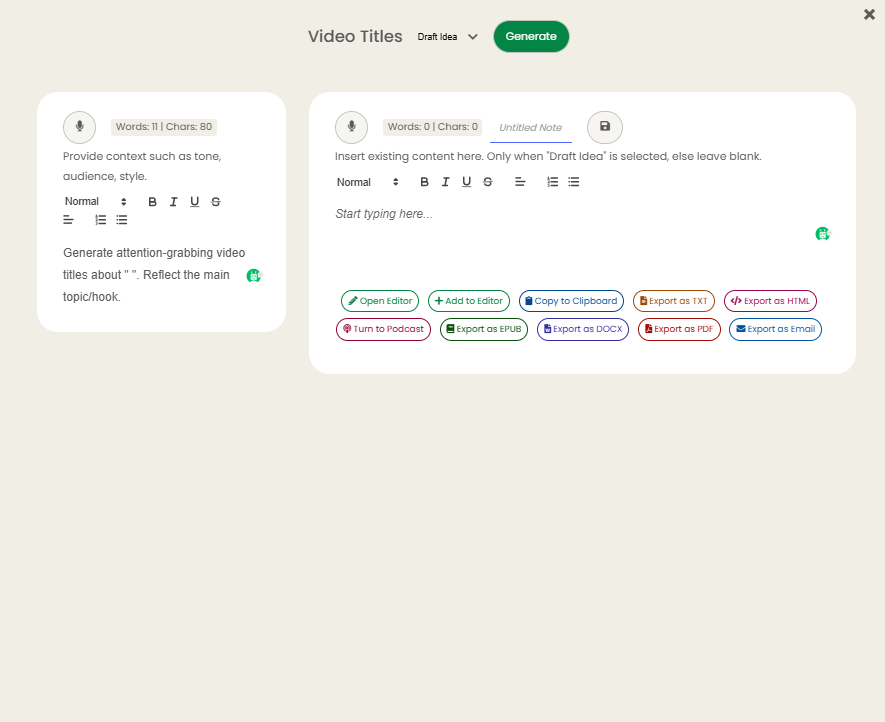
10. The template will present you with several input fields designed to gather essential information about your video. The more detailed and specific your inputs, the better your results will be.
Key Information to Provide:
- Video Topic/Subject: Clearly describe what your video covers, Example: “How to start a successful food blog from scratch”
- Target Audience: Specify who you’re trying to reach, Example: “Beginner bloggers interested in food and cooking”
- Video Type: Tutorial, review, entertainment, news, etc. Example: “Step-by-step tutorial”
- Key Benefits/Value: What will viewers gain from watching? Example: “Learn to monetize food content and build an audience”
- Tone/Style: Professional, casual, energetic, authoritative, Example: “Friendly and encouraging but professional”
- Keywords (Optional): Important terms for SEO, Example: “food blogging, monetize blog, cooking content”
Step 6: Generate Your Titles
11. After filling in all relevant fields, click the “Generate” button. The AI will process your information and create multiple title options within seconds.
12. Review the generated titles, which typically include various styles:
- Question-based titles (“How Do You Start a Profitable Food Blog in 2024?”)
- Benefit-focused titles (“Turn Your Love of Cooking Into a $5K/Month Food Blog”)
- Number-based titles (“7 Essential Steps to Launch Your Food Blog Successfully”)
- Urgency-driven titles (“Start Your Food Blog Today: Complete Beginner’s Guide”)
13. Use the regenerate function if you want additional options or refine your inputs for more targeted results.
Best Practices and Tips for Superior Results
Pro Tip: Specificity Drives Quality
The more specific and detailed your input, the more targeted and effective your generated titles will be. Avoid vague descriptions like “cooking video” and instead use “30-minute weeknight dinner recipes for busy families.”
Optimize Your Input Strategy
- Include Emotional Triggers: Words like “ultimate,” “secret,” “mistake,” “surprising” often increase engagement
- Specify Your Niche: “Photography” vs. “Portrait photography for beginners” yields vastly different results
- Mention Unique Angles: What makes your video different from the thousands of others on similar topics?
- Consider Current Trends: Reference relevant events, seasons, or trending topics when applicable
Evaluate Generated Titles Effectively
- Read Aloud Test: Does the title flow naturally when spoken?
- Clarity Check: Can someone immediately understand what the video offers?
- Length Consideration: Aim for 60 characters or fewer to avoid truncation in search results
- Emotional Appeal: Does the title create curiosity, urgency, or promise clear value?
Customize and Refine
Remember that AI-generated titles are starting points, not final products. Feel free to:
- Combine elements from multiple generated titles
- Adjust wording to match your brand voice
- Add specific numbers, dates, or unique selling points
- Test different variations to see what resonates with your audience
Track Performance and Learn
Monitor which AI-generated titles perform best for your content and use these insights to improve future inputs. Pay attention to patterns in your highest-performing titles and incorporate those elements into your AI prompts.
Conclusion: Transform Your Content Strategy Today
Video title generation no longer needs to be a time-consuming creative struggle. AI tools like WordWriter democratize access to data-driven, psychologically-informed title creation that was once available only to major media companies with extensive research resources.
By implementing the strategies and step-by-step process outlined in this guide, you’re equipped to create compelling, click-worthy titles that not only capture attention but also accurately represent your content’s value. This alignment between promise and delivery builds audience trust and encourages long-term engagement with your content.
Ready to revolutionize your video title creation process? Start by visiting WordWriter today and experimenting with their video title generator. Begin with one of your recent videos—input the details following our guide and compare the AI-generated options with your original title. You might be surprised by the creative possibilities you discover.
Your audience is waiting for content that speaks directly to their needs and interests. With AI-powered title generation, you have the tools to ensure they find it.
