
How to Generate Compelling Blog Post Conclusions

Learning how to generate compelling blog post conclusions is the key to leaving a lasting impression on your readers. A great blog post isn’t just about the introduction and body; the conclusion is your final opportunity to summarise your message, reinforce your value, and motivate your audience to take action. It’s what ensures your content sticks with them long after they’ve finished reading. However, many writers struggle to move beyond a simple summary, often resorting to weak or repetitive phrases that fall flat.
This is where AI can be a powerful partner. It helps you craft a conclusion that is both concise and impactful, tying all your main points together into a memorable final statement. In this article, we’ll dive into the core principles of a compelling conclusion and show you how WordWriter’s AI tool simplifies the process, turning a routine task into a strategic part of your content creation.
Structure Of a Good Blog Post Conclusion
A blog post conclusion should do more than just restate what you’ve already said. Its purpose is to provide closure, cement your main argument, and guide your reader on what to do next. Here’s what a great conclusion must include:
1. A concise summary of key points: Briefly remind your readers of the main takeaways. Rephrase your core arguments to avoid sounding repetitive.
2. A memorable final thought: Leave your reader with something to think about. This could be a new perspective, a thought-provoking question, or a strong, final statement that reinforces the importance of your topic.
3. A clear call to action (CTA): Tell your reader exactly what you want them to do next. This could be to leave a comment, share the article, subscribe to a newsletter, or check out a related product. A strong CTA transforms a reader into an engaged participant.
How to Generate Compelling Blog Post Conclusions: WordWriter
WordWriter’s AI-powered templates make it incredibly simple to create a powerful conclusion that checks all the boxes. Instead of brainstorming from scratch, you can use the tool to generate well-structured, persuasive conclusions that you can then easily refine.
Here’s the step-by-step process:
1. Log In to WordWriter
First, go to wordwriter.co and log in to your account. If you’re a new user, you can quickly sign up to access the full range of AI writing tools.

2. Navigate to the Writer’s Templates
From your dashboard, find the “Writer Templates” section. Scroll through the list or use the search bar to find the “Blog Post Conclusion” option. Click on it to open the tool.

3. Provide Your Prompts and Key Points
This is where you give the AI the information it needs. You’ll enter details about your blog post to ensure the conclusion is relevant and accurate:
- Title of your blog post: (e.g., “10 Essential Tips for Remote Work Productivity”)
- Main points of your article: List the core arguments or tips you covered in the body (e.g., “Use time-blocking, set clear boundaries, take regular breaks, use productivity tools”).
- Key takeaway or central message: Summarize the main idea of the article in one sentence (e.g., “Effective remote work relies on discipline and the right tools”).
- Desired Call to Action: What should the reader do next? (e.g., “Leave a comment,” “Share this article,” “Sign up for our newsletter”).

4. Generate and Refine
Click the “Generate” button. WordWriter’s AI will analyze your inputs and provide several conclusion options. You can review the outputs, select the one you like best, and then easily make any final edits to match your brand’s voice. This is your chance to add a personal touch or a unique final thought that resonates with your audience.
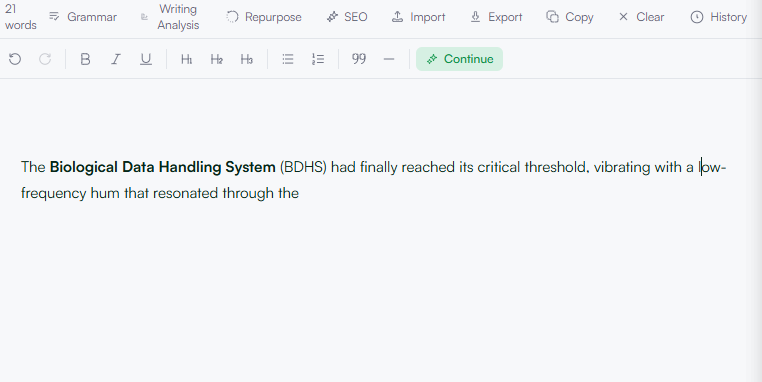
5. Copy or Export Your Final Conclusion
Once you’re satisfied with the result, you can copy the text to your clipboard or use one of the many export options available. WordWriter lets you save your work in various formats for easy integration into your blog’s content management system.
Related: How to Write Compelling Blog Post Headlines That Drive Traffic
Conclusion
A compelling blog post conclusion is the difference between an article that’s simply read and one that is remembered and acted upon. By following the core principles of summarizing, leaving a final thought, and including a strong call to action, you can ensure your content has a lasting impact.
Thanks to AI tools like WordWriter, generating these powerful conclusions no longer has to be a struggle. It simplifies the process, allowing you to focus on creating great content from start to finish. Use it as your trusted partner to make every final sentence count.
