
How to write a cover letter using AI

How to write a cover letter using AI is becoming an essential skill in today’s competitive job market, where a standout cover letter can be the difference between landing an interview and getting lost in the applicant pool.
It’s your chance to make a powerful first impression, showcasing your skills, experience, and enthusiasm for a role in a personalised way. However, writing a unique and impactful cover letter for each application can be time-consuming and challenging. You want to sound professional, enthusiastic, and perfectly tailored to the job description, but the blank page often feels daunting.
This is where artificial intelligence steps in as your ultimate writing assistant. AI tools can scale your job application process, helping you craft compelling cover letters that capture recruiters’ attention. And when it comes to efficiency and quality, WordWriter’s AI-powered cover letter generator is a game-changer. In this article, we’ll explore why leveraging AI for cover letters is a smart strategy and then guide you through WordWriter’s intuitive process. Let’s dive in.
Related: How to Write an Application Letter with AI
Why AI is Your Go-To for Cover Letter Creation
The idea of using AI for something as personal as a cover letter might seem unusual at first, but the benefits are undeniable. WordWriter’s AI acts like a dedicated career coach and writing expert rolled into one, helping you articulate your value proposition with clarity and impact. Here’s why it’s become an indispensable tool for job seekers:
1. Tailored Content, Fast
One of the biggest challenges in cover letter writing is customisation. Each letter should be unique to the job and company. WordWriter’s AI excels at this, quickly generating content that aligns with specific job descriptions, company values, and your own resume highlights. This saves hours of manual writing and research for every application.
2. Professional Tone and Structure
AI tools are trained on vast datasets of professional writing, ensuring your cover letter adheres to standard business communication etiquette. WordWriter helps maintain a formal, respectful, and persuasive tone, while also structuring your letter logically with clear paragraphs, a strong opening, and a compelling call to action.
3. Overcome Writer’s Block
Staring at a blank page can be paralyzing. AI provides an immediate starting point, breaking through writer’s block and giving you a solid draft to work from. It sparks ideas for phrasing, helps you articulate your strengths, and ensures you don’t miss key points.
4. Highlight Key Skills and Experiences
You might have a wealth of experience, but how do you succinctly connect it to the job requirements? WordWriter’s AI can intelligently identify relevant keywords from the job description and your inputs, ensuring your cover letter effectively showcases how your skills and experience directly benefit the employer.
5. Save Time, Apply More
The more quality applications you can submit, the higher your chances of success. By drastically reducing the time spent on drafting cover letters, WordWriter allows you to focus on tailoring your resume, practising for interviews, and applying to more opportunities.
Your Step-by-Step Guide to Writing a Cover Letter with WordWriter
WordWriter makes crafting a powerful cover letter incredibly simple. It’s designed to guide you through the process, ensuring you produce a document that stands out. Here’s how to use it:
1. Log In to WordWriter
Begin by heading to wordwriter.co and logging into your account. If you’re new to the platform, a quick sign-up will grant you access to all its powerful AI writing tools.

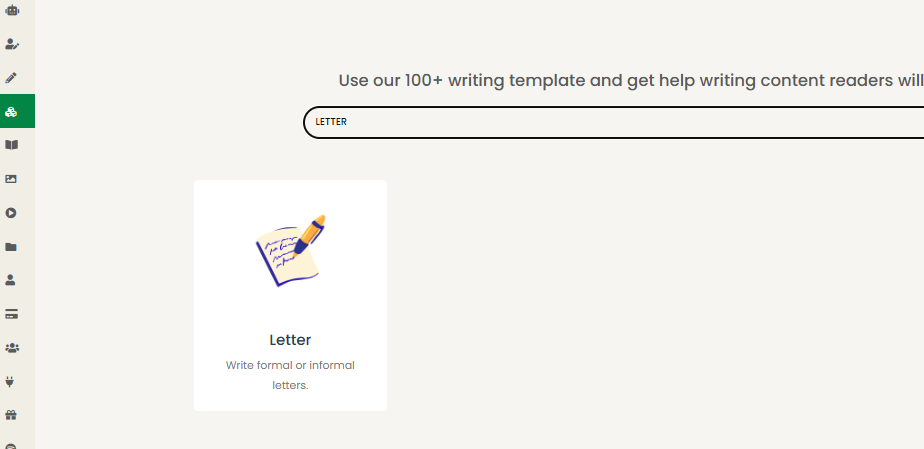
2. Select the ‘Letter’ Template
Once in your dashboard, navigate to the “Writer Templates” section. Look for the category related to “Letters” or “Documents” and specifically click on the “Letter” option. This template is designed to provide the foundational structure for a professional cover letter.
3. Provide Your Prompts and Details
This is where you feed the AI the information it needs to create your personalized cover letter. Be as specific as possible:
- Your Name and Contact Information: (e.g., John Doe, [email protected], 555-123-4567)
- Hiring Manager’s Name (if known) or Title: (e.g., Ms. Jane Smith, Hiring Manager)
- Company Name and Address: (e.g., Acme Corp., 123 Main St., Anytown, USA)
- Job Title you’re applying for: (e.g., Marketing Specialist)
- Key skills and experiences you want to highlight: (e.g., “5 years in digital marketing, SEO expertise, content creation, strong analytical skills”)
- Specific achievements or projects: (e.g., “Increased website traffic by 30% in six months,” “Led a successful social media campaign”)
- Why you’re interested in this specific role/company: (e.g., “Passionate about sustainable energy, admire Acme Corp.’s commitment to innovation”)
- Keywords from the job description: Copy and paste a few key phrases directly from the job posting to ensure alignment.
The more detailed your prompts, the more tailored and effective your AI-generated cover letter will be.
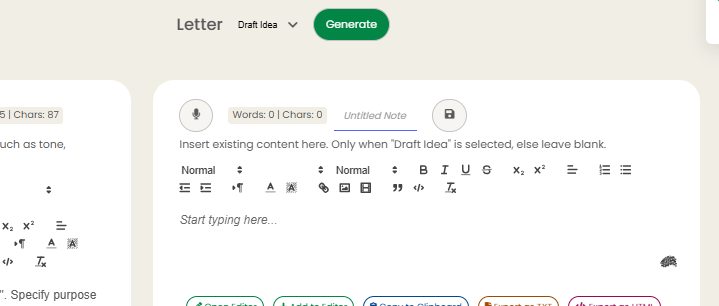
4. Generate and Customize
Click the “Generate” button. WordWriter’s AI will process your inputs and produce a draft of your cover letter. Review the output carefully. While the AI provides an excellent foundation, you’ll want to personalize it further. Add anecdotes, refine phrasing to perfectly match your voice, and ensure every sentence genuinely reflects your candidacy.
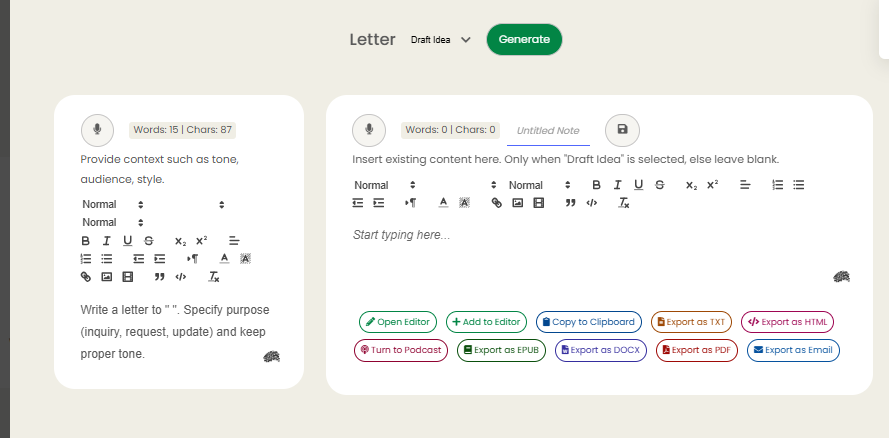
5. Copy or Export in Your Preferred Format
Once you’re satisfied with your cover letter, WordWriter offers various export options to seamlessly integrate it into your application process:
- Open Editor: Continue refining the letter within WordWriter.
- Add to Editor: Incorporate it into a larger document or writing project.
- Copy to Clipboard: Instantly copy the text to paste into online application forms or email bodies.
- Export as TXT, HTML, DOCX, or PDF: Save your cover letter in the most common and widely accepted formats for easy submission.
Conclusion
In the competitive landscape of job searching, the ability to produce strong, personalized cover letters is a significant advantage. AI tools like WordWriter don’t replace your unique experiences and aspirations, but they powerfully augment your ability to present them effectively.
By streamlining the writing process, ensuring professional quality, and helping you tailor each letter to perfection, WordWriter empowers you to submit more applications with confidence and precision.
Embrace the efficiency of AI to highlight your qualifications, impress hiring managers, and take a significant step toward your next career opportunity.
Ready to scale your cover writing skill, start with Wordwriter today!
