
How to write SEO meta descriptions With AI

Learning how to write SEO meta descriptions is an expedient skill, because a meta description is your website’s elevator pitch in the search results. It’s the short snippet of text that appears under your page title, and while it might not directly impact your search engine ranking, it plays an important role in convincing users to click on your link. A well-written meta description can significantly boost your click-through rate (CTR), sending a powerful signal to search engines that your content is valuable and relevant.
Writing an effective meta description is a skill, but it’s one that can be mastered with a few key principles and the right tools. In this article, we’ll walk you through the essential elements of a great meta description and then show you how WordWriter’s AI-powered tools make the process simple and fast.
Related: How to Use AI to generate Quotes
Key Principles for Writing a High-Converting Meta Description
A compelling meta description is a blend of clear communication, strategic keywords, and a persuasive call to action. Here’s what you need to focus on:
1. Keep it Concise (155-160 characters):
This is the golden rule. Google will often truncate meta descriptions that are too long, so keep your most important information at the beginning. Aim for a length that works on both desktop and mobile devices.
2. Include Your Target Keyword:
Naturally weave your primary keyword into the description. When a user’s search query matches a word in your meta description, Google bolds it, making your result stand out and signaling relevance.
3. Use an Active Voice and a Clear Call to Action (CTA):
Instead of a passive description, use action verbs to tell the user what they’ll get. Phrases like “Discover how,” “Shop our collection,” or “Learn more” give a clear direction and encourage a click.
4. Showcase Your Value Proposition:
What makes your page unique? Use the meta description to highlight a key benefit, a special offer, or the unique information your page provides. This helps you stand out from the competition.
5. Match the User’s Search Intent:
A meta description should accurately reflect the content of the page. If your page is a guide, your description should promise information. If it’s a product page, it should describe the product’s benefits. Misleading descriptions lead to high bounce rates, which is a negative signal to search engines.
How to Write SEO Meta Descriptions with WordWriter
WordWriter’s AI-powered templates make it easy to generate high-quality, optimized meta descriptions in minutes. You no longer have to brainstorm and manually count characters for every page. The tool automates the process while keeping all the best practices in mind.
Here’s the straightforward process for creating a meta description using WordWriter:
1. Log In to WordWriter
Go to wordwriter.co and sign in to your account. If you’re a new user, you can quickly sign up to access the full suite of AI tools.

2. Navigate to the Writer’s Templates
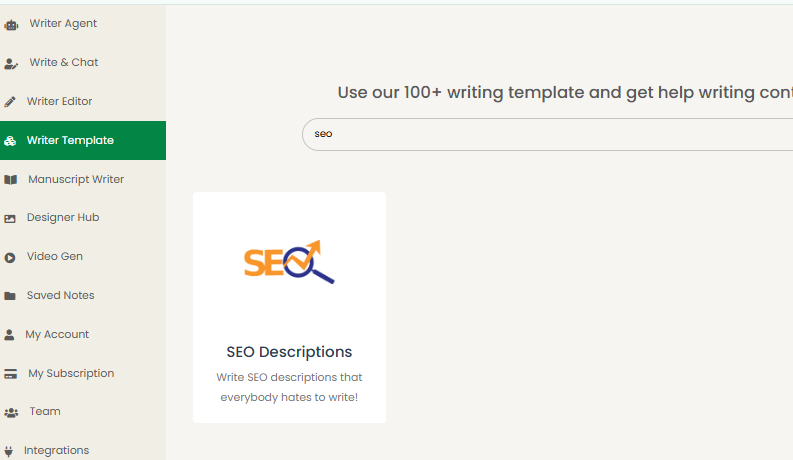
From your dashboard, find the “Writer Templates” section. Scroll through the list or use the search bar to find the “SEO Meta Description” tool. Click on it to open the template.
3. Add Your Prompts
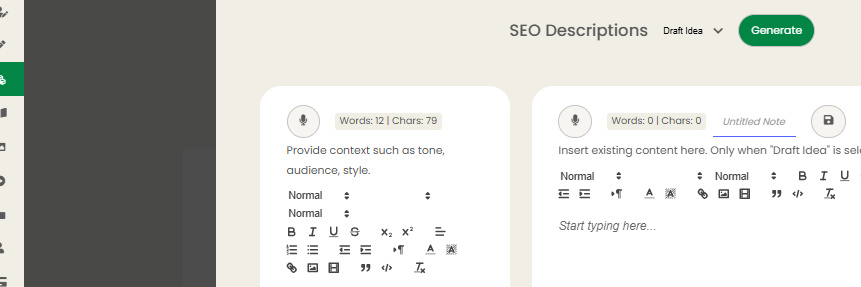
In the input box, you’ll provide the key information the AI needs to generate the meta description. This is where you’ll specify:
i. Your target keyword: The main term you want to rank for (e.g., “how to write SEO meta descriptions”).
ii. A brief description of your content: Explain what the page is about and its unique value (e.g., “A step-by-step guide on creating effective SEO meta descriptions with examples and tips.”).
iii Desired tone: (e.g., “Professional,” “Friendly,” or “Informative”).
4. Generate and Refine
Click the “Generate” button. The AI will provide you with several meta description options that are optimised for length, keywords, and a compelling CTA. You can review the outputs and choose the one that best fits your needs.
5. Copy or Export Your Final Description
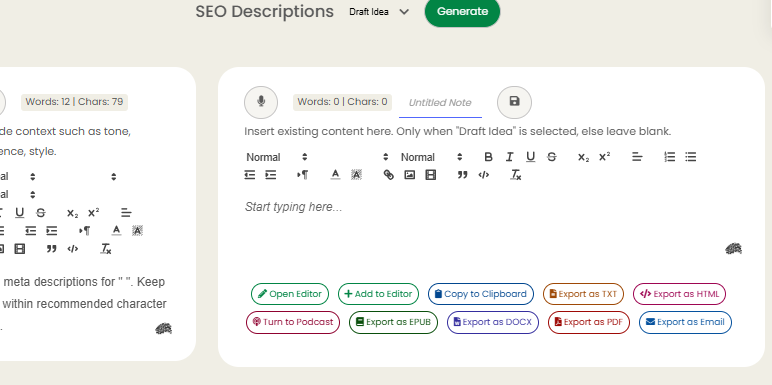
Once you’ve found the perfect meta description, you have several options for how to use it. You can:
i. Open Editor: Make further tweaks and edits directly in WordWriter.
ii. Add to Editor: Add the generated text to a larger document you’re working on.
iii. Copy to Clipboard: Instantly copy the text to paste it directly into your website’s CMS.
iv. Export as TXT, HTML, DOCX, or PDF: Save the content in your preferred file format for easy use and sharing.
This streamlined process allows you to quickly create SEO-friendly meta descriptions at scale, ensuring every page on your site has a compelling snippet that drives clicks and improves your online visibility.
Conclusion
In the competitive world of search engines, every detail counts. While the content on your page is what truly matters, the meta description is your first opportunity to make a lasting impression and attract a user’s click.
By following the key principles of conciseness, keyword inclusion, and a strong call to action, you can significantly improve your click-through rate. The process doesn’t have to be a manual chore.
Tools like WordWriter empower you to create optimized, high-quality meta descriptions quickly and efficiently, ensuring your content stands out and gets the attention it deserves. Use it as your trusted partner to simplify a crucial step in your SEO strategy and watch your click-through rates climb.
Want to take your SEO meta description writing game to the next level, start with Wordwriter today!
