
The 8 Best Social Media Tools 2026
When it comes to social media, consistency isn’t optional, it’s everything. Posting regularly keeps your audience engaged, helps you stay visible in feeds, and builds long-term brand trust. Yet for many content creators, marketers, and small businesses, staying consistent is easier said than done.
The biggest challenge? Time and efficiency. From brainstorming content ideas to creating posts, writing captions, scheduling across multiple platforms, and tracking performance, social media can quickly become overwhelming.
Many creators want to show up consistently, but they’re unsure which tools to use or how to streamline their workflow without burning out.
That’s where AI-powered social media tools come in. These tools are designed to make content creation faster, smarter, and more efficient.
With features like AI content generation, post scheduling, idea brainstorming, and performance insights, they help creators boost productivity while maintaining quality and consistency.
In this article, we’ll explore the 8 best social media tools that help you create better content, stay consistent, and work smarter not harder.
The 8 Best Social Media Tools 2026
1. WordWriter
WordWriter is built specifically to solve one of the biggest social media problems: what to say and how to say it consistently. It focuses on AI-generated written content for social platforms, including captions, bios, tweets, post descriptions, hooks, and short-form copy.
What makes WordWriter stand out is how it approaches social writing. Instead of producing long, generic text, it generates short, platform-ready content that aligns with how people actually write on social media. Creators can input a simple idea or prompt, and WordWriter produces multiple caption variations, allowing users to choose, tweak, or remix content quickly.
Its AI adapts tone, length, and structure depending on the use case, whether you’re writing a professional LinkedIn post, a casual Instagram caption, or a punchy tweet. This makes it especially useful for creators and brands managing multiple platforms who want consistency without sounding robotic.
WordWriter is best used as the starting engine of your content workflow. It removes the friction of writing from scratch, speeds up ideation, and helps maintain a consistent posting rhythm without creative fatigue.
Pros
- Generates platform-specific captions, bios, and post copy quickly
- Helps maintain a consistent brand voice across social platforms
- Reduces writer’s block by offering multiple content variations
2. ChatQuick
ChatQuick is designed to tackle the idea stage of content creation. Instead of focusing on final copy alone, it helps creators figure out what to post, how to frame it, and which angle to take.
The tool excels at generating prompts, hooks, post ideas, and content frameworks. Creators can input a general topic, niche, or goal, and ChatQuick produces multiple directions, such as educational posts, storytelling angles, carousel ideas, or engagement-driven hooks.
This makes ChatQuick especially powerful for creators who post frequently and struggle with idea burnout. Rather than repeating the same content themes, it helps diversify content formats and approaches, making social feeds feel fresh and intentional.
ChatQuick fits best into the brainstorming and planning phase of content creation. Many creators use it alongside writing tools or schedulers to keep their content pipeline full.
Pros
- Excellent for brainstorming post ideas, hooks, and themes
- Helps creators maintain variety and creativity in content
- Speeds up planning and ideation workflows
Cons
- Not a publishing or scheduling tool
- Generated ideas still require execution using other tools
3. Planable
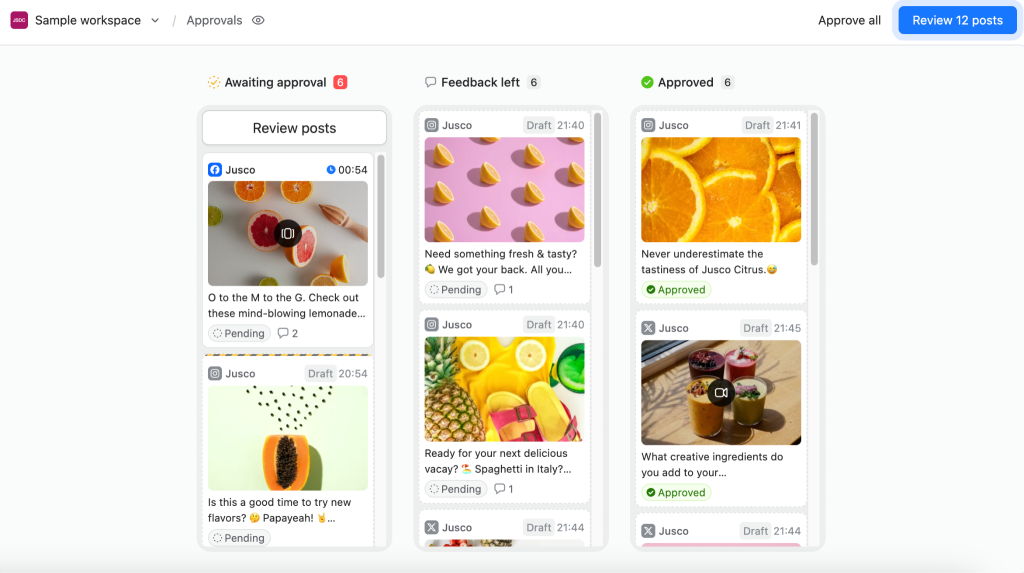
Planable is a social media management tool for teams and agencies that need collaboration, review, and approval workflows alongside content scheduling.
Unlike tools such as Buffer or Later, which often focus on simpler publishing workflows, Planable adds a structured collaboration and approval layer to social media scheduling. Its visual content calendar supports multi-channel planning and publishing across Facebook, Instagram, LinkedIn, Twitter/X, TikTok, YouTube, Pinterest, Google Business Profile, and Threads.
In Planable, teams can draft posts, preview content, leave real-time comments, add annotations directly on visuals, and suggest text edits in a workflow similar to Google Docs. Approval settings can be adjusted from no approval or optional approval to mandatory and multi-level approvals, depending on how much sign-off each post requires.
For agencies and client-facing teams, Planable also supports guest links so clients or stakeholders can review and approve posts without creating an account. The platform includes an AI Assistant for captions and rewrites, a media library for brand assets, a unified Social Inbox for comments, and cross-channel analytics with shareable reports.
Pros
- Combines scheduling with structured approval workflows, making it suitable for teams and client-facing work
- Multi-level approvals and guest review links reduce back-and-forth over email
- AI Assistant supports caption generation, rewriting, and tone-matching across platforms
Cons
- Not built for solo creators or freelancers; Planable is designed for collaborative teams
- No direct integration with CMS platforms
Paid plans start at $39/month per workspace, with a free trial available.
4. Buffer
Buffer is primarily a scheduling and publishing tool, but it has evolved to include AI support inside the content creation process. Its AI features assist with drafting post captions, repurposing content, and adapting messaging for different platforms.
Instead of treating AI as a separate tool, Buffer integrates it directly into the posting workflow. While scheduling a post, creators can generate caption ideas, rewrite text for different tones, or create multiple platform-specific versions of the same message.
This approach makes Buffer useful for creators who already have ideas but want help filling their content calendar efficiently. It reduces the friction between writing and scheduling, allowing users to plan weeks of content in one session.
Buffer is best suited for creators who value simplicity, consistency, and workflow clarity rather than deep analytics or complex automation.
Pros
- Combines AI writing assistance with scheduling
- Easy-to-use content calendar for consistent posting
- Supports multi-platform publishing
Cons
- AI writing features are basic compared to dedicated AI tools
- Limited advanced analytics and optimization insights
5. Canva
Canva is a visual-first platform that uses AI to simplify design for social media. Its AI features support everything from generating design layouts to creating text, resizing visuals, and editing images automatically.
Creators can start with a simple prompt or idea, and Canva’s AI helps generate ready-to-use graphics for posts, stories, reels, and carousels. It also assists with writing short copy inside designs, making it easier to align visuals with messaging.
For social media creators, Canva acts as the visual production engine. It allows non-designers to produce professional-looking content quickly, which is critical for maintaining posting consistency on visual platforms.
Pros
- AI simplifies design for non-designers
- Fast creation of social graphics and video assets
- Templates speed up visual consistency
Cons
- Advanced AI features are locked behind paid plans
- Not built for scheduling or performance analytics
6. Flick

Flick positions itself as an AI social media assistant focused on optimization rather than creation alone. Its AI helps creators research hashtags, analyze performance trends, and plan content more strategically.
Instead of guessing which hashtags or topics will perform well, Flick uses AI to suggest data-driven recommendations. It also supports content planning and scheduling, making it useful for creators who want insights alongside execution.
Flick is particularly helpful for creators who care deeply about reach, discoverability, and audience growth, especially on platforms like Instagram.
Pros
- Strong AI-driven hashtag research and suggestions
- Helps improve content discoverability
- Supports planning and scheduling workflows
Cons
- Learning curve for advanced features
- Less focused on long-form or creative writing
7. Hootsuite
Hootsuite uses AI to support content ideation, optimization, and strategic decision-making at scale. Its AI tools help generate captions, suggest hashtags, repurpose content, and analyze trends across platforms.
Unlike creator-focused tools, Hootsuite’s AI is designed for teams and organizations managing multiple accounts. It focuses more on strategy, timing, and performance insights rather than just creative output.
Hootsuite is best for businesses that need structure, reporting, and collaborative workflows alongside AI assistance.
Pros
- AI supports content ideation and optimization at scale
- Strong analytics and team collaboration features
- Suitable for managing multiple social accounts
Cons
- Higher cost compared to creator-focused tools
- Can feel complex for solo creators
8. Later
Later focuses on visual content planning and uses AI to assist with captions, hashtags, and posting flow. Its strength lies in helping creators visualize how their feed will look before publishing.
The AI features support content suggestions and hashtag ideas, helping creators align visuals with engagement-focused copy. This makes it ideal for platforms where aesthetics matter.
Later works best for creators who prioritize visual consistency and feed planning over deep analytics.
Pros
- Strong visual content planning tools
- AI helps with captions and hashtag suggestions
- Ideal for Instagram-first strategies
Cons
- Limited analytics depth
- AI features are not as advanced as dedicated AI tools
9. Notion
Notion isn’t a publishing tool, but its AI plays a major role in planning and organization. Creators use it to generate content calendars, outlines, campaign plans, and posting workflows.
Notion’s AI helps turn scattered ideas into structured plans, making it easier to stay consistent over time. It’s often used alongside writing, design, and scheduling tools.
Pros
- Excellent for planning and organizing content strategies
- AI speeds up calendar and workflow creation
- Great for collaboration and documentation
Cons
- No direct posting or analytics
- Requires setup to get full value
Conclusion
With WordWriter, you can create scroll-stopping captions, bios, tweets, and post copy in minutes.
It helps you beat writer’s block, stay consistent across platforms, and focus on creating instead of overthinking what to say. If content consistency is your goal, WordWriter gives you the words – fast, clear, and ready to post.
