
Sentence Expander: Enhance Sentence Length Instantly

A great sentence expander can be a total game-changer, especially when you’re staring at a sentence that feels too short, too simple, or just not powerful enough to capture a reader’s attention. Maybe you’re a journalist trying to add more context to a breaking story, a student aiming to meet a word count on an essay, or a marketer crafting the perfect, punchy ad copy. The frustration is real when you know what you want to say but can’t find the words to add depth without sounding clunky or forced.
That’s where AI-powered sentence expansion becomes a game-changer, and we’ve found a tool that truly stands out: WordWriter’s sentence expander. It’s like having a co-writer on demand, transforming bare-bones phrases into rich, engaging prose in seconds.
WordWriter makes it easy for anyone to elevate their writing, whether you’re a seasoned pro or just starting out. This article will walk you through why WordWriter’s sentence expander is our go-to and show you its super-simple process for creating polished, impactful content that truly pops.
Let’s get started.
Related: How to brainstorm Ideas: 6 Effective Ways To
Why WordWriter is the Ultimate Sentence Expander
1. It’s Lightning-Fast and Rich with Detail
WordWriter takes a short sentence and transforms it into a detailed, descriptive one in a matter of seconds. This feature saves you from endless brainstorming sessions, allowing you to add meaningful context and vivid imagery with just a click. Instead of thinking, “How can I describe this better?” you can simply let the AI do the heavy lifting, providing you with a strong foundation to build upon.
2. It Understands and Preserves Your Voice
One of the biggest fears with AI writing tools is that they’ll make your content sound robotic or generic. WordWriter addresses this head-on. Its AI is designed to understand your tone and intent, expanding sentences to match your unique style.
Whether you need a professional tone for a news report, an academic voice for a research paper, or a casual, friendly vibe for a social media post, the tool adapts seamlessly, ensuring your content always sounds like you.
3. It’s Intuitive and User-Friendly
You don’t need to be a tech expert to use WordWriter. The interface is clean, simple, and intuitive. There are no complicated settings or steep learning curves to navigate. You can jump right in, paste your sentence, and get to work without wrestling with confusing options. This ease of use makes it a perfect tool for everyone, from busy professionals to students and freelance writers.
4. It’s Versatile for Any Content Type
No matter what you’re writing, WordWriter has you covered. The tool is highly versatile, handling everything from blog posts and reports to email newsletters and ad copy. This makes it a perfect solution for journalists, content marketers, academics, and anyone who needs to create high-quality content on a regular basis.
5. It Boosts SEO and Clarity
Effective writing is clear and engaging, and WordWriter helps you achieve both. The tool can intelligently weave in relevant keywords or details, making your content more appealing to search engines while simultaneously improving its readability. By providing more context and detail, it helps you create content that is not only well-written but also optimized for online visibility.
Your Step-by-Step Guide to Expanding Sentences with WordWriter
Expanding your sentences with WordWriter is so easy it feels like a secret weapon. We’ve used it to flesh out everything from news snippets to marketing blurbs, and it truly feels like a magic wand for your writing. Here’s the exact process—it’s just a few simple steps to get you started.
Step 1: Log In to WordWriter
First things first, head over to wordwriter.co and log into your account. If you’re a new user, the sign-up process is fast and straightforward, giving you instant access to WordWriter’s full suite of AI tools, including the sentence expander.

Step 2: Find the Sentence Expander Tool
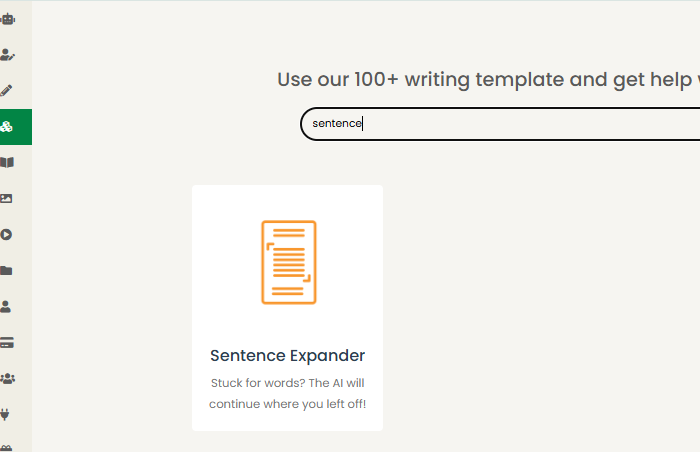
Once you’re in the dashboard, navigate to the “Writer Templates” section. You can either scroll through the list or use the search bar to find the “Sentence Expander” option. Click on it to open the tool, and you’ll be ready to witness the AI magic.
Step 3: Paste Your Sentence
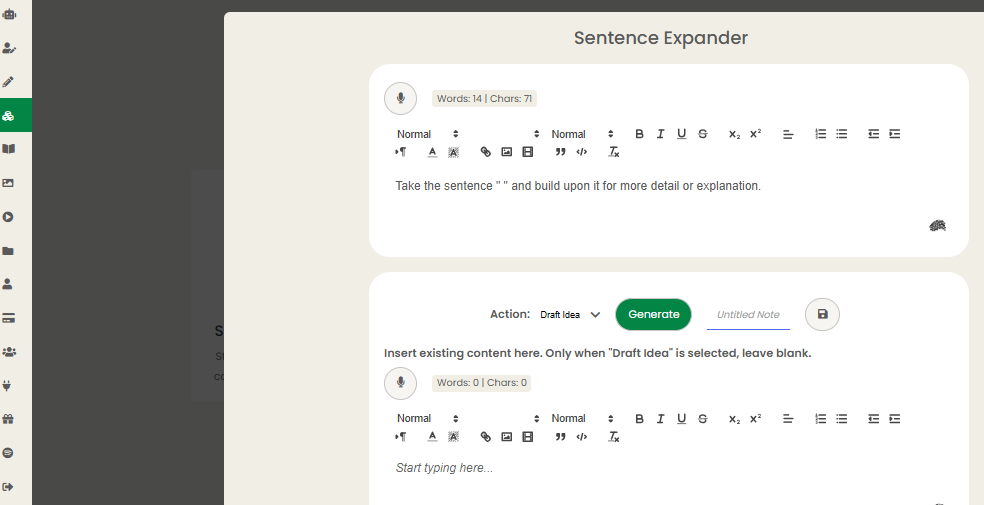
This is where you bring your writing to the table. Copy the sentence you want to expand and paste it directly into the input box. To get the best possible results, make sure your starting sentence is clear and concise. WordWriter’s AI works best when it has a solid, well-defined foundation to build on.
Step 4: Click “Generate” and Refine
Now for the fun part! Hit the “Generate” button and let WordWriter’s AI analyse your sentence and add depth, context, or descriptive details. The tool will provide you with an expanded version that you can then review and tweak as needed in the editor.
Conclusion
AI tools like WordWriter’s sentence expander are revolutionising how we write, helping us move past the struggle of flat sentences and create content that’s vibrant, detailed, and impactful. By following its straightforward steps—finding the tool, pasting your sentence, and clicking “Generate”—you can craft content that is perfectly suited for a news article, an essay, or a marketing campaign.
You can also seamlessly integrate it into your existing workflow. For instance, after expanding your sentences with WordWriter, you can use other tools for a final polish, deeper insights and structural suggestions. This powerful combination gives you a writing workflow that is truly unstoppable.
It’s time to make every sentence a standout and ensure your writing leaves a lasting impression. Start with Wordwriter today!
