
Content Repurposing With AI: A Quick Guide
Content repurposing with AI is the strategic practice of using Artificial Intelligence tools to transform and adapt existing content into different formats, platforms, or contexts to reach new audiences, extend content lifespan, and maximize return on investment. Rather than creating entirely new content from scratch, repurposing involves taking your best-performing or most valuable content and giving it new life through creative adaptation.
This approach goes beyond simple reposting – it’s about reimagining your content to serve different purposes, appeal to various audience segments, and leverage the unique strengths of different platforms and formats.
Why Content Repurposing is Important
1. Maximizes Content ROI
Creating high-quality content requires significant time, effort, and resources. Repurposing allows you to extract maximum value from each piece of content by multiplying its reach and impact across multiple channels and formats.
2. Reaches Diverse Audience Preferences
People consume content differently – some prefer reading detailed articles, others enjoy visual infographics, while many favor video or audio content. Repurposing ensures your message reaches audiences regardless of their preferred content format.
3. Improves SEO and Online Visibility
Repurposed content creates multiple touchpoints across different platforms and search engines, increasing your chances of being discovered. Each variation targets different keywords and ranking opportunities.
4. Reinforces Key Messages
Repetition through different formats helps reinforce important messages and increases the likelihood that your audience will remember and act on your content.
5. Saves Time and Resources
Rather than starting from zero, repurposing leverages existing research, ideas, and insights, making content creation more efficient and cost-effective.
6. Extends Content Lifespan
Great content doesn’t have to disappear after its initial publication. Repurposing gives evergreen content multiple lives across different timeframes and platforms.
7. Fills Content Calendar Gaps
Repurposing provides a reliable content source during busy periods or creative blocks, ensuring consistent publishing schedules.
Types of Content That Can Be Repurposed
Long-Form Content
- Blog posts and articles → Social media posts, infographics, podcasts, videos
- Research reports → Blog series, webinars, case studies, white papers
- Ebooks → Email courses, blog post series, workshop materials
- Case studies → Social proof posts, video testimonials, presentation slides
Visual Content
- Infographics → Social media carousels, blog post illustrations, presentation slides
- Photos → Quote graphics, before/after comparisons, tutorial steps
- Screenshots → Tutorial guides, comparison posts, feature highlights
- Charts and graphs → Social media posts, presentation materials, report excerpts
Video Content
- Webinars → Blog posts, podcast episodes, social media clips, course modules
- Tutorial videos → Step-by-step blog posts, infographic guides, social media tips
- Interview videos → Podcast episodes, quote graphics, blog articles
- Product demos → Feature highlight posts, comparison charts, FAQ content
Audio Content
- Podcasts → Blog post transcripts, social media quotes, video clips
- Interviews → Article features, quote collections, video highlights
- Audio courses → Written guides, infographic summaries, presentation materials
Social Media Content
- Twitter threads → Blog posts, newsletter content, LinkedIn articles
- Instagram stories → Permanent post highlights, blog content, email tips
- LinkedIn posts → Blog articles, presentation slides, email content
- Facebook posts → Blog excerpts, newsletter sections, video scripts
Data and Research
- Survey results → Infographics, blog posts, social media statistics
- Industry statistics → Quote graphics, presentation slides, email insights
- Trend analyses → Prediction posts, comparison content, expert commentary
Educational Content
- Courses and workshops → Blog series, email sequences, social media tips
- Presentations → Blog posts, infographic summaries, video explanations
- FAQ collections → Individual blog posts, social media Q&As, video responses
- How-to guides → Video tutorials, infographic steps, email courses
Marketing Materials
- Email newsletters → Blog posts, social media content, website copy
- Press releases → Blog announcements, social media updates, video news
- Customer testimonials → Case studies, social proof posts, video testimonials
- Company updates → Blog posts, social media announcements, newsletter content
Content Repurposing Strategies
Format Transformation
- Written content → Visual content (infographics, videos)
- Long-form → Short-form (blog posts → social media posts)
- Static → Interactive (articles → quizzes, polls)
Platform Adaptation
- Blog content → Platform-specific social media posts
- Webinar content → YouTube videos and podcast episodes
- Research reports → LinkedIn thought leadership articles
Audience Segmentation
- Technical content → Simplified versions for general audiences
- General content → Industry-specific adaptations
- B2B content → B2C versions and vice versa
How to Repurpose Content Using AI
Log Into WordWriter
Make sure you are logged into your WordWriter account and can access the AI dashboard.
Navigate to Content Repurposing
Access the Dashboard
On the AI dashboard, locate the top left corner where you’ll find your project options.
Choose Your Starting Point
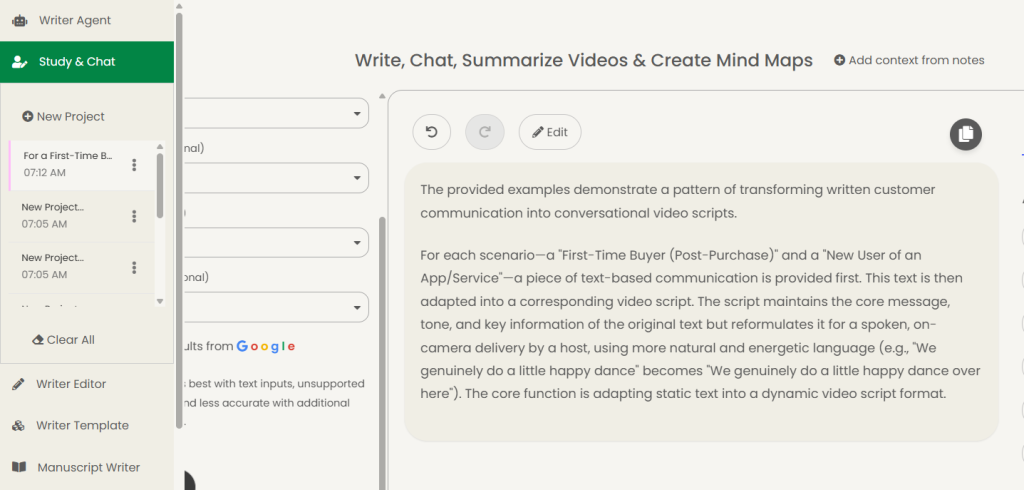
You have two options:
- Tap on “Study and Chat Template”, or
- Click on “+ New Project Tab” (located just beneath the study and chat features)
Set Up Your Repurposing Project
Find Repurposing Options
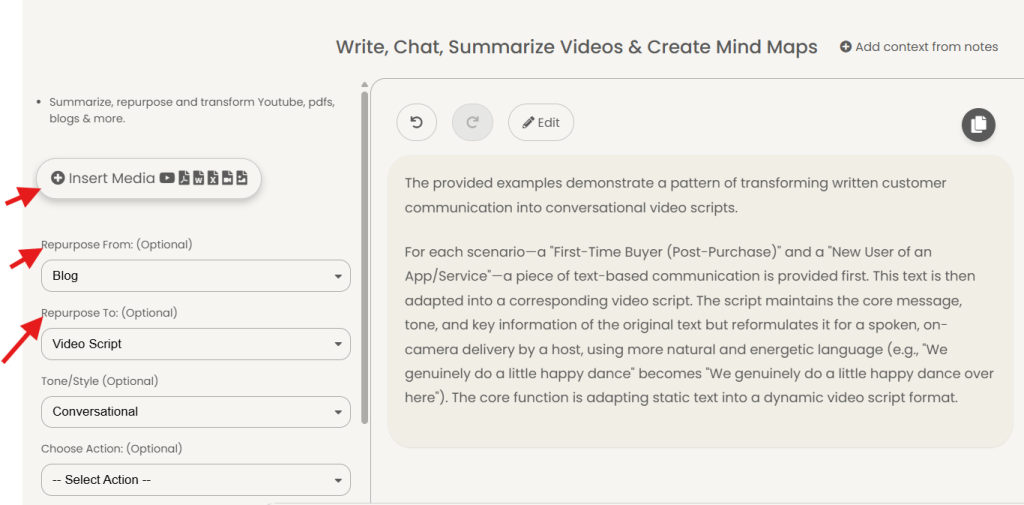
On the page that displays, look at the top left corner for repurposing options.
Upload Your Content
Click on “Insert Media” to upload the document you want to repurpose.
Configure Your Content Transformation
Select Content Types
Choose the format you’re repurposing from and what you want to repurpose to (e.g., video to blog post, document to social media content).
Choose Your Tone
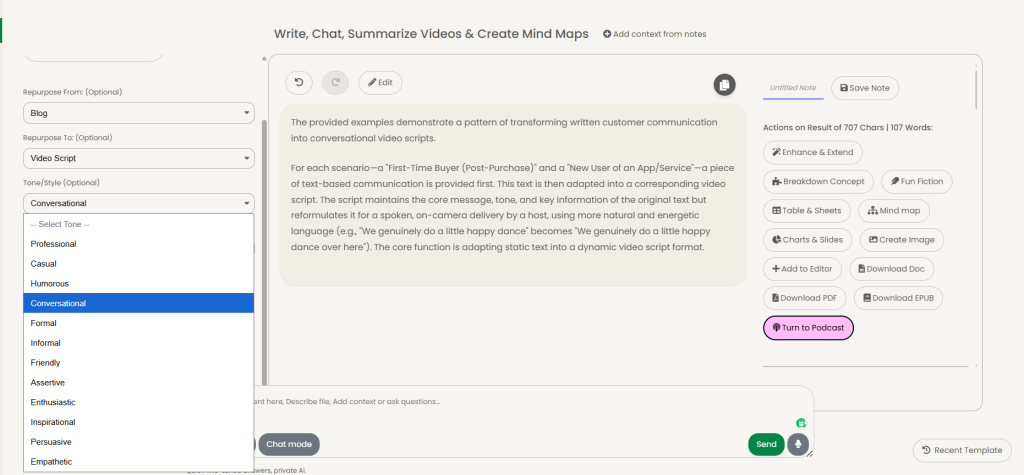
Select the appropriate tone for your content:
- Conversational – for casual, friendly content
- Professional – for business and formal content
- Other tone options – based on your specific needs
Generate Your Content
Start the Process

Click on “Send” to begin the AI content generation.
Wait for Results
Allow several minutes for the AI to analyze your content and generate the repurposed version.
Review and Add Structure
Add Subheadings
Once your content is generated, enhance it by adding clear subheadings to organize the information and improve readability.
Final Review
Check the generated content for accuracy and make any necessary adjustments before using it.
Conclusion
Content repurposing with AI through WordWriter represents a game-changing opportunity for content creators and marketers to maximize their content ROI while minimizing time investment.
By following these simple steps—from logging into the platform to adding final subheadings—you can transform a single piece of content into multiple formats that reach diverse audiences across various platforms.
